

Charter schools are progressively depending on Chromebooks to enhance student learning, utilizing 1:1 programs, blended learning approaches, or digital assessments. However, even the most dependable devices can experience issues if they overheat.
For schools that are investing in fleets of devices, it is crucial to comprehend Chromebook thermal management—and to recognize when to seek expert assistance.
Why Chromebook Cooling Isn’t Just a Tech Headache
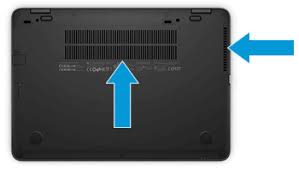 Chromebooks often use passive cooling, meaning no internal fans. They depend on external cooling vents and efficient casing to dissipate heat. Block those vents—or use the device on soft surfaces like beds or couches—and performance diminishes fast.
As processors throttle under heat, students can experience lag, battery drain, or even forced shutdowns—leading to downtime during critical learning tasks.
Smart Thermal Habits for Classroom Use
Here are actionable tips to avoid Chromebook overheating and keep Chromebooks cool, tied to those crucial keywords:
| Thermal Management Tip | Description |
|---|---|
| Avoid soft surfaces | Never allow Chromebooks to sit on beds, pillows, couches, or laps without a solid base. These surfaces can easily block heat vents. |
| Keep vents clear | Ensure vents—usually located on the underside or back—are unobstructed, whether the device is on a desk or privacy stand. |
| Use flat, hard surfaces | Operate and charge Chromebooks only on flat, hard surfaces to promote proper airflow and heat dissipation. |
| Monitor ambient temperature | In warm, poorly ventilated classrooms or mobile carts without fans, monitor temperature buildup to avoid excessive heat accumulation. |
| Establish cooling breaks | Schedule short breaks during high-intensity activities to allow devices time to cool down. |
| Avoid intensive apps back-to-back | Heavy apps (like video editing or streaming) raise internal temps. Plan lessons to alternate with lighter tasks or device swaps. |
Those habits significantly reduce Chromebook overheating risks.
But what happens when thermal issues still crop up—or damage already exists?
When Good Habits Aren’t Enough
Even well‑handled Chromebooks eventually show signs of wear: pads, fans (if present), keyboards, displays, or batteries may degrade. As overheating becomes chronic or devices outright fail, relying on internal staff to repair piles of broken Chromebooks can bog down your tech team—and learning.
Join Inspiroz’s Chromebook Repair Program designed specifically for Charter Schools.
-
Sustainable & Budget‑Friendly Repairs
-
Fast, Turn‑Key Fixes
-
Schools don’t have to task internal staff with time-consuming break‑fix work.
-
Nationwide Scope
-
Data‑Safe & Eco‑Conscious Logistics
Inspiroz’s Chromebook Repair Program reduces downtime and frees staff bandwidth for higher‑impact tasks.
Integrating Thermal Management with Organized Repair
By combining good thermal practices with a robust repair program, schools can greatly improve Chromebook uptime and lifecycle value:
A Simple Workflow
- Train staff and students on thermal best practices: flat surfaces, airflow, ambient awareness.
- Track broken or underperforming devices regularly via helpdesk tickets or inventory audits.
- Bundle those devices, ship or schedule pickup with Inspiroz.
- Receive repaired Chromebooks in approximately 30 days, ready to deploy back to students or spare pool.
- Recycle non-repairable parts, keeping future repair inventory in-house.
Outcomes You’ll See
- Lower device failure rates over time, reducing new-device purchases.
- More consistent device uptime in the classroom.
- Reduced operational burden on tech coordinators.
- A more sustainable, cost-effective device lifecycle.
Real‑World Fit: Inspired by Blended Learning Models
Charter schools increasingly adopt blended learning, relying on Chromebooks for personalization, assessment, and remote extensions. Under thermal strain, that tech backbone becomes vulnerable.
Similarly, a 3‑year technology plan—like those recommended by Inspiroz—not only includes device refresh and Wi‑Fi infrastructure, but device repair and maintenance schedules integrated into goal alignment and budgeting.
Inspiroz’s managed IT services, including the Chromebook Repair Program, fit neatly into plans that call for predictable costs, strategic device refresh cycles, and minimized downtime.
Chromebook Thermal Care & Repair : Best Practices Summary
| Focus Area | Strategy |
|---|---|
| Thermal Management | Use on hard surfaces, avoid blocking vents, schedule cooling breaks |
| Device Inventory | Monitor performance, identify overheating or casing damage early |
| Repair Management | Bundle broken units and use Inspiroz’s cost-effective, sustainable model |
| Fleet Maintenance | Recycle parts, return repaired devices within ~30 days |
| Lifecycle Planning | Integrate tech usage, repair, refresh into your 3‑year plan |
Get Your Chromebooks Working Again
Contact Inspiroz today to schedule your Chromebook Repair Program pickup or shipping.
We’ll handle the logistics, manage data-safe break/fix repairs using recycled parts, and return working Chromebooks—so students get back to learning faster.